While you may be using this app every day, there may be a few hidden features that you may not know of.
Here are a few features on WhatsApp that you can boast of knowing (in case you didn't already).
1. You don't need to tell people you're ignoring them - Hide blue texts
Curious about the 'unread' messages lying in your WhatsApp? And worried that you might have to reply to someone you don't want to? No worries! Switch off the blue ticks on WhatsApp using these simple instructions: Settings > Account > Privacy > Read Receipts
Now your messages remain unread - at least for the sender!
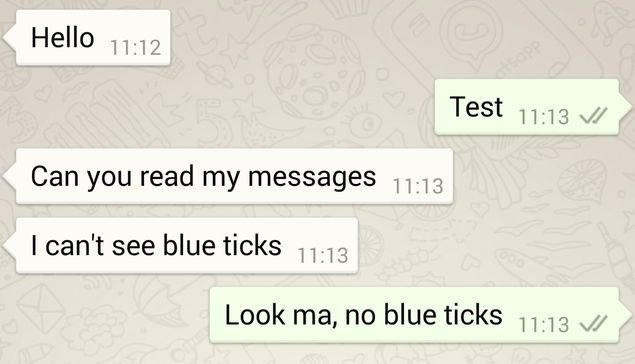
2. Hiding your last seen for a peaceful life
Hiding the read receipts might not be all, as there might be someone to tell you that you were online but didn't check their messages. Hide your last seen using these simple steps: Settings > Account > Privacy > Last Seen
Now you can be online or offline anytime you want without giving any justifications to anyone.

3. Make your point in bold
Giving any special instructions or just want to make your point noticeable and strong? Bold the text in your WhatsApp messages using this very simple trick. Put asterisks on either side of the word like *this* and voila!

4. Emphasize using Italics
Not just bold, you can also italicise your text. Put underscore on both sides of the word like _this_ and you are good to go.

5. Strikethrough like a pro!
Yes, now you can easily strikethrough text. Grab some attention and strikethrough text ~just like this~ and be a WhatsApp pro!

6. Best friend customized WhatsApp?
Can't go even a day without talking to each other? It is super comfortable to create a shortcut of your best friend's chat box and place it right on your home screen.
A long press on the desired chat will launch a menu of options, including the 'Add chat shortcut' tab. Sharing pictures and gossip just got quicker and easier.

7. Star your messages
You don't need to keep going back to that one message your crush sent which made your heart skip a beat or that important text about your exam date sheet or notes.
Simply star the message and view them all at once in the starred messagescolumn.

8. Go old school and use the typewriter font
Go a little old school with your WhatsApp conversations like this: enclose your message with three characters of ` on either side. Send the message and it'll go through in the typewriter font.

9. See who you prioritize the most
Want to check who you spend your maximum time with in the virtual world?
Go to Settings > Data Usage > Storage Usage.
The window will show you a ranking of chats according to the amount of data spent, along with messages or media exchanged.

10. Delete embarrassing messages and typos
Sent something by mistake and now want to delete it?WhatsApp introduced its new Delete for everyone feature enabling us to delete messages after they have been sent.
Now when you send a message to someone that you don’t want them to read, simply hold down the message, and select delete for everyone.
Earlier WhatsApp allowed you to 'delete for everyone' only for a span of 7 minutes but now this has been extended to an hour.

11. Limit data usage
Do not want those unnecessary pictures and videos to keep getting downloaded from family and college groups?
You can control how much data you consume by limiting the types of media you automatically download on a mobile connection.
Go to Settings > Data Usage and choose the option best for you. This would help you save on a lot of data which you can use elsewhere.

12. Customise notifications
If you’re expecting an important WhatsApp message from someone, set a custom notification for them by opening the chat, tapping their name at the top and hitting Custom notifications. This way, you won't be missing out on the important stuff.

Do it right!
Comments
Post a Comment